Technology
Quick Tech Tips - Attaching a Logger middleware to Redux
To add a logger middleware to the redux application, the following steps can be followed 1. Install 'redux-logger' locally for your project 2. The file where redux store is created in your application, make the changes…

To add a logger middleware to the redux application, the following steps can be followed
1. Install 'redux-logger' locally for your project

2. The file where redux store is created in your application, make the changes as follows (marked yellow)
import {configureStore, combineReducers} from '@reduxjs/toolkit'
import { purchaseReducer } from '../Reducers/Reducer';
import logger from 'redux-logger';
const rootreducer = combineReducers({purchaseReducer});
export const shop = configureStore({
reducer:rootreducer,
middleware:(getDefaultMiddleware) => getDefaultMiddleware().concat(logger)}
);
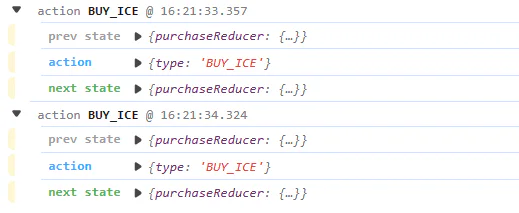
3. That's it. Each time you alter a state, The output should look as follows
Originally published on Inspire Innovative Learning.
View the original article