Technology
Quick Tech Bits - React Redux Integration Using Hooks
Steps to create and integrate Redux Application with React using @reduxjs/toolkit and Hooks 1. To create a redux aware react app, the following installations are required. 2. Create the actions, reducers, store as…

Steps to create and integrate Redux Application with React using @reduxjs/toolkit and Hooks
1. To create a redux aware react app, the following installations are required.

2. Create the actions, reducers, store as follows
export const BUY_ICE = 'BUY_ICE';export const BUY_CHOC = 'BUY_CHOCOLATE'//Create actionsexport const buyicecream = () => {return {type: BUY_ICE}}
import { BUY_ICE, buyicecream } from "../Actions/Actions";const initialState = {ice_stock: 100}
export const purchaseReducer = (prevState = initialState, action) => {switch(action.type){case BUY_ICE:return {...prevState,ice_stock: prevState.ice_stock-1};default:return prevState;}
}
Store.js
import {createStore} from 'redux'import {configureStore, combineReducers} from '@reduxjs/toolkit'import { purchaseReducer } from '../Reducers/Reducer';const rootreducer = combineReducers({purchaseReducer});export const shop = configureStore({reducer:rootreducer});//export const shop = createStore(reducer); //Deprecated...
3. Create a react component. In this component import the new hooks "useDispatch", "useSelector". These hooks come from the library 'react-redux'. They perform the task of mapping the redux library's dispatch function to react component, mapping redux store object to react component respectively, as shown in the code below.
In this react component, a button that updates the icecream stock of the redux's store (as created above) is done.
import {useDispatch, useSelector} from 'react-redux';
import { buyicecream } from './Actions/Actions';
export let MyShop = ()=>{
const dispatchfn = useDispatch(); //redux built-in dispatch fn to dispatch action to redux store thru reducer
const shopData = useSelector(store => store.purchaseReducer); //assign redux global store (state obj) to variable
console.log(shopData);
return(<>
<div className='text-primary'>
Ice cream Stock: {shopData.ice_stock}
</div>
<button className='btn btn-primary' onClick= {()=>dispatchfn(buyicecream())}>BUY ICECREAM</button>
</>);
}
4. Add this to the index js or the route configuration in your react app. This component will be wrapped inside the <Provider> which is provided by 'react-redux' package.
import {shop} from './Store/store' //comes from redux's store created above
import {Provider} from 'react-redux';import { MyShop } from './ReduxIntegration'; //react component
let ReduxComponent = () =>{return (<Provider store={shop}><MyShop/></Provider>)}
//In the route configuration add it as followsexport let Container = () => {return(<BrowserRouter><Routes><Route path='/redux' element={<ReduxComponent/>}/></Routes></BrowserRouter>)}
5. Finally add it to the correct virtual DOM in index.js as shown.
Index.js
const root = ReactDOM
.createRoot(document.getElementById('root'));
root.render(<React.StrictMode><Container/></React.StrictMode>);
To execure, be sure you have navigated to your project directory from command terminal

This completes the integration, using Hooks and the @reduxjs/toolkit
When executed, the output should look as follows
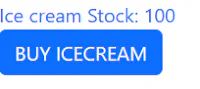 CLICK BUY ICECREAM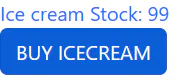
Originally published on Inspire Innovative Learning.
View the original article